 Naru News日本語
What is a prompt in AI?
Also called: AI prompt

In one minute
A prompt is the text you give a generative AI such as ChatGPT or Claude: the instructions or question it works from to write a reply (you can attach images or files too).
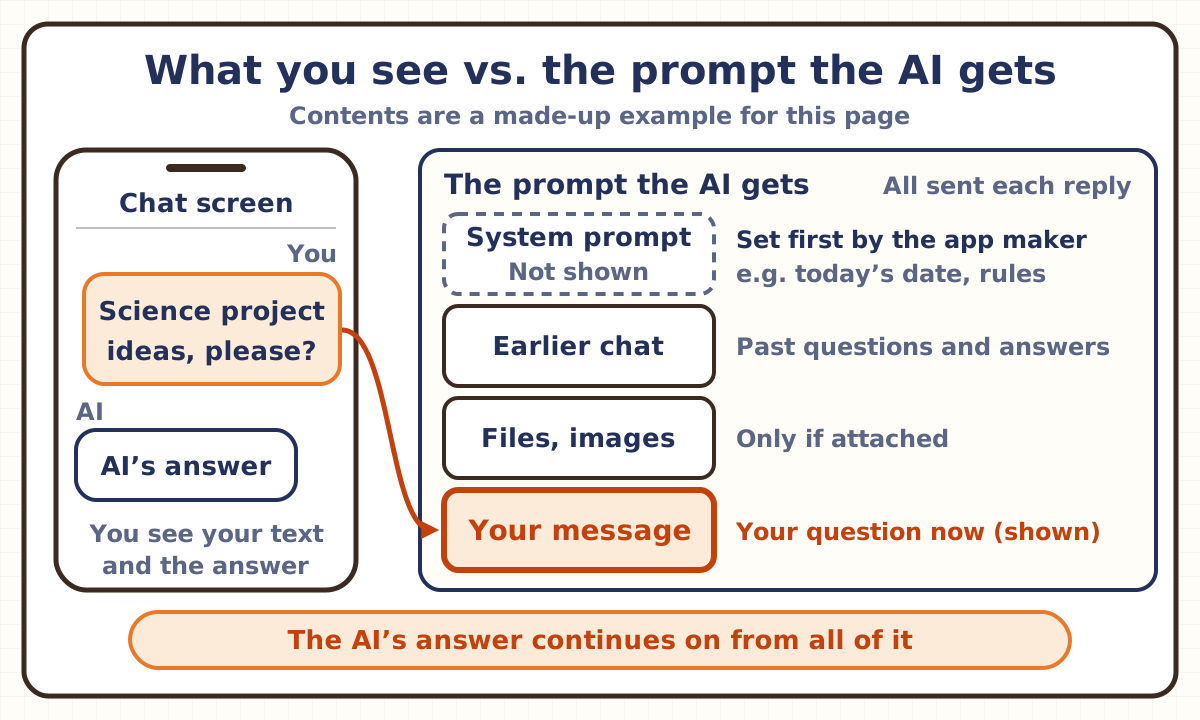
A large language model writes its answer as a continuation of the prompt it receives. Besides what you type, the prompt also holds instructions the app’s makers put in first (the system prompt) and the conversation so far.
How you write it changes the answer. The prompting guides from AI companies all recommend writing clearly and specifically, including the information and background the answer needs, and showing examples.
A common mix-up
“There are magic words that make an AI work better.”
Half right. Wording really can change the answer. In a 2022 study by researchers at the University of Tokyo and Google, adding “Let’s think step by step.” before the answer to a math problem raised the share of correct answers on one test from 17.7% to 78.7%. But in the same study, “First,” another phrase that nudges the model to think in order, did almost as well (77.3%), while unrelated words like “Abrakadabra!” did not help. What worked was the push to think in steps, not the exact words. And for today’s reasoning models, which think before answering, OpenAI says there is no need to ask them to “think step by step,” because they reason internally. What the three companies’ guides recommend is not memorizing magic words but stating your goal, background and limits clearly and showing examples.
Explained in pictures
Think of it like this
A note for a brilliant new helper
A prompt is like a note you hand to a helper who knows a lot but has just started. The helper has read plenty, but knows nothing about you or why you are asking. All they have to go on is what is in your note, plus the rules the shop gave them beforehand (the system prompt). Anthropic’s guide, too, suggests thinking of Claude as “a brilliant but new employee who lacks context on your norms and workflows.”
If your note just says “Make it nice,” the helper has to imagine the rest. Write who it is for, why, by when and in what form, and attach one finished example, and what comes back gets closer to what you wanted.
The comparison has limits. A person might ask what you meant, or remember last week’s note. An AI may fill in what you left out by guessing, and it cannot see anything that is not in that turn’s prompt (although features such as an app’s “memory” can put earlier things into the prompt).
Key points
What goes into a prompt?
A prompt is any text entered into a large language model to get it to behave in a certain way. Besides questions and instructions, examples, a role for the AI to play and a half-written text for it to finish can all be prompts.
And it is not only what you type. In chat apps, the prompt also holds instructions the app’s makers put in first, called the “system prompt.” Anthropic’s claude.ai and its mobile apps, for example, use a system prompt to give Claude up-to-date information, such as the current date, at the start of every conversation, and it also asks for certain behaviors, such as always giving code in a set format (Markdown). Anthropic publishes these system prompts.
OpenAI’s docs say instructions from the app’s developer (developer messages) take priority over what the user writes (user messages). Google’s Gemini calls them “system instructions,” and its docs give the example “You are a cat. Your name is Neko.”
The conversation so far and any attached files or images go in too. With Google’s Gemini, for example, you can give it images, video, audio and documents along with text. There is a limit on how much the prompt and the AI’s answer can hold together, called the context window (see the “Context window” page).
How does the AI use the prompt to answer?
A large language model (LLM) works out which words are likely to come next in a text and builds sentences by adding words one at a time (see the “Large language model” page). When it gets a question, it treats the prompt as the start of a text and writes the continuation that is the answer. A generative model works like an advanced auto-completion tool.
But a model that has only practiced guessing what comes next on lots of text is not naturally good at answering questions or following instructions. Getting the behavior you want from such models often takes deep skill in prompt engineering. Chat AIs such as Claude are then trained further (fine-tuned) to follow instructions and be helpful.
The same prompt does not always get the same answer. Identical inputs can produce different outputs from one call to the next. That is why OpenAI’s docs call prompting to get the output you want “a mix of art and science.”
How do you write a prompt that gets across?
OpenAI, Anthropic and Google each publish a guide to writing prompts (we read them all on November 8, 2026). They put it differently, but some advice is shared.
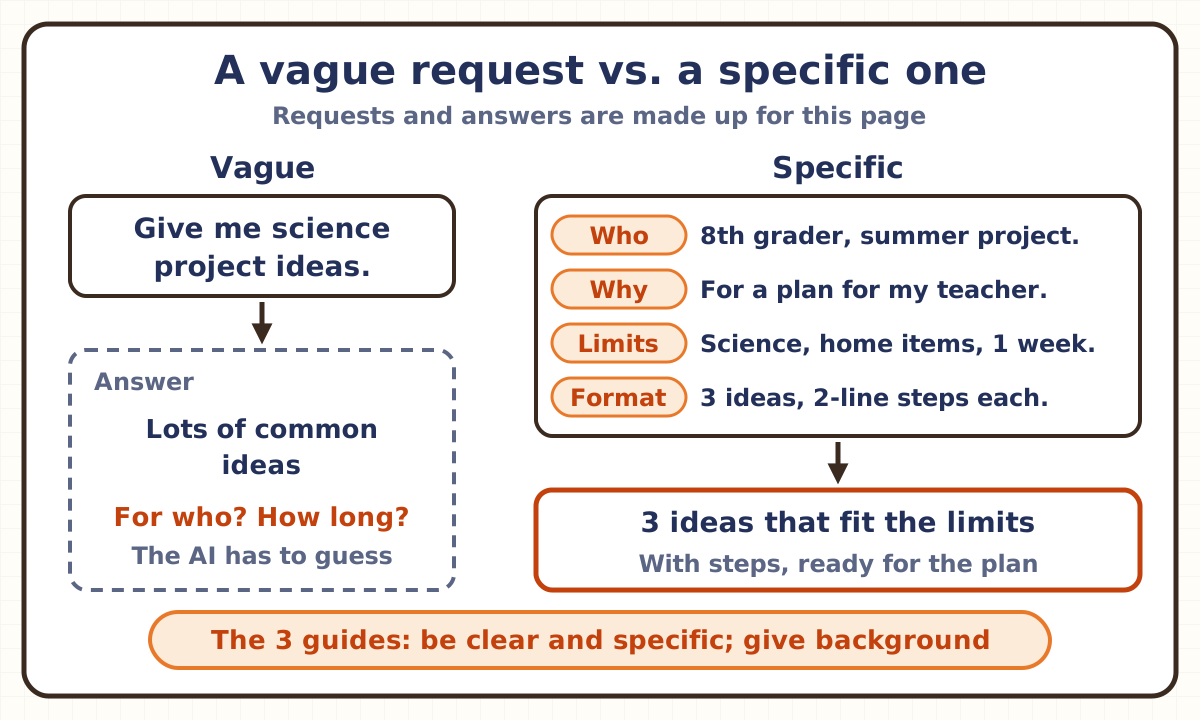
First, be clear and specific. All three recommend clear, specific instructions, and say that spelling out the output you want, or what makes a response successful, helps improve results.
Second, include the information and background the answer needs. Anthropic’s guide gives an example: rather than just writing “NEVER use ellipses,” it is better to explain why: “Your response will be read aloud by a text-to-speech engine, so never use ellipses since the text-to-speech engine will not know how to pronounce them.” With the reason, the AI can apply it to other cases too. Information the model can use (context) also goes into the prompt.
Third, show examples (see “What changes when you show examples?”). The guides also recommend spelling out the format and limits you want, and marking off the instructions, documents and examples with tags (such as XML tags).
As a way to test a prompt, Anthropic suggests showing it to a colleague with minimal context on the task and asking them to follow it: “If they’d be confused, Claude will be too.”
What changes when you show examples?
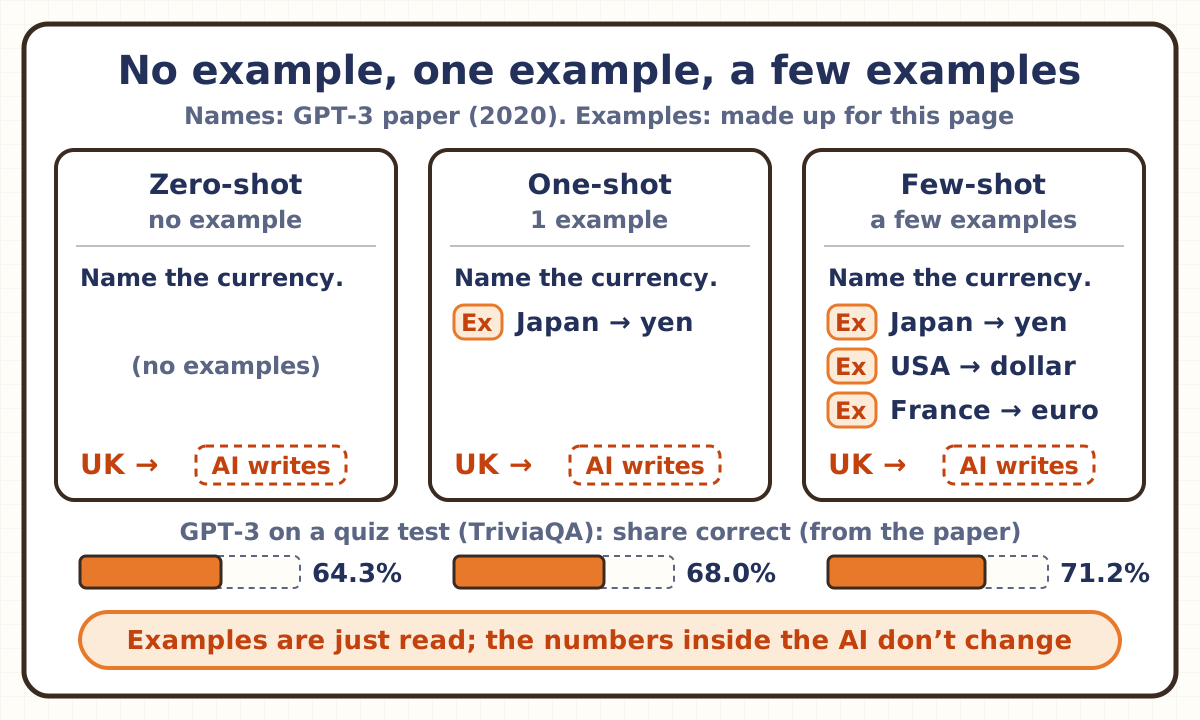
One way to prompt is to show examples of what you want. In 2020, OpenAI researchers, in the paper on GPT-3 (a large language model with 175 billion parameters), called asking with only a text that describes the task “zero-shot,” adding one example to that description “one-shot,” and showing a few examples “few-shot.” In the paper, few-shot prompts usually held 10 to 100 examples, because that is how many fit into the 2,048 tokens GPT-3 could read at once (a token is a small unit an AI splits text into; see the “Token” page).
On TriviaQA, a test of answering quiz questions, GPT-3 got 64.3% right zero-shot, 68.0% one-shot and 71.2% few-shot.
The key point is that showing examples does not rewrite the numbers inside the AI (its parameters). In the few-shot setting, no weight updates are allowed: the examples are only read when the model answers. So when the conversation ends, the examples do not stay inside the AI (see “Does it get smarter the more you use it?” on the “Large language model” page).
Today’s guides recommend examples too. Google recommends always including examples in your prompts and says prompts without them are likely to be less effective, but also warns that with too many examples, the model may start to overfit its answers to them. Anthropic recommends 3 to 5 examples that closely mirror your real use and cover a variety of cases. OpenAI, on the other hand, says reasoning models (AIs that think before answering) often don’t need examples to do well, so try writing prompts without them first.
Does writing “Let’s think step by step” make answers better?
It can. In January 2022, Google’s Jason Wei and colleagues showed that if the examples in a prompt include not only answers but also the in-between thinking (a chain of thought), a very large model gets better at solving math word problems and more (see the “Reasoning model” page). In May of the same year, researchers at the University of Tokyo and Google showed that even without examples, just adding “Let’s think step by step.” before the answer raised an AI called InstructGPT (text-davinci-002) from 10.4% to 40.7% correct on a math word-problem test called GSM8K.
The paper also compared many phrases. On MultiArith, a math test, the AI got 17.7% right with nothing added. “Let’s think step by step.” got 78.7%, and “First,” got 77.3%, almost the same. But “Abrakadabra!” got 15.5% and “It’s a beautiful day.” 13.1%: no improvement. Performance improved when the text encouraged the model to reason in steps, and did not improve with misleading or irrelevant text.
With today’s reasoning models (AIs that think before answering), things are different. OpenAI’s docs say that because these models reason internally, asking them to “think step by step” or “explain your reasoning” is unnecessary. Google says the Gemini 2.5 and 3 series generate their own internal thinking, so it is generally not necessary to have them lay out reasoning steps in the answer. Anthropic writes that a general instruction such as “think thoroughly” often produces better reasoning than a hand-written step-by-step plan.
Where does the word “prompt” come from?
From English. The Japanese word purompto comes from the English prompt, meaning “to urge.” The verb prompt means to urge someone, and also to help an actor who is stuck on a line by cueing the words. As an adjective, prompt means “quick.”
The characters or symbols on a computer screen that invite the user to type something are also called a prompt (Nihon Kokugo Daijiten). Digital Daijisen gives “command prompt” as the word’s first meaning and, as its second, the words or text you type into a generative AI to get the output or answer you intend. It also lists the term “AI prompt.”
Can an AI be tricked through its prompt?
Yes. An attack in which someone hides instructions inside a web page, email or document the AI will read, to make the AI do what they want, is called “prompt injection” (see the “Prompt injection” page).
The OWASP Gen AI Security Project, which works on the safety of AI applications, puts it first (LLM01) on its 2025 list of risks for large language model applications. There are “direct” injections, where a user’s prompt changes the model’s behavior in unintended ways, and “indirect” ones, planted in outside content the model takes in, such as websites or files, and the hidden input does not even need to be visible to people.
Check yourself
Q1In a chat AI app, besides the question the user typed, what can also be in the prompt the AI receives?
Answer and explanation
Answer: B Instructions the app’s makers wrote in first
Instructions the app’s makers put in first are called the system prompt. On claude.ai, for example, the system prompt gives information such as the current date. The prompt also holds the conversation so far and any attached files. The huge amount of text the AI learned from is not in the prompt.
Q2If you show an AI a few examples of what you want inside the prompt before asking (few-shot), what happens to the numbers it calculates with (its parameters)?
Answer and explanation
Answer: C It reads them; its numbers stay the same
In the few-shot setting, no weight updates (parameter changes) are allowed; the examples are only read as part of the prompt when the model answers. Even so, in the GPT-3 paper, on TriviaQA, a quiz test, the share of correct answers rose from 64.3% with no examples to 71.2% with a few. When the conversation ends, the examples do not stay inside the AI.
More on this → Key points: What changes when you show examples?
Q3In a 2022 study by the University of Tokyo and Google, adding “Let’s think step by step.” before the answer to a math problem raised the share of correct answers on one test from 17.7% to 78.7%. What happened when “First,” was added instead?
Answer and explanation
Answer: A It rose to nearly 78.7%
With “First,” it reached 77.3%, almost the same rise as with “Let’s think step by step.” But “Abrakadabra!” got 15.5%, with no improvement. Performance improves when the text encourages the model to think in steps. It was not one fixed phrase working like a magic spell.
More on this → Key points: Does writing “Let’s think step by step” make answers better?
Related terms
- Prompt injection
- Large language model
- Context window
- Reasoning model
- Token
- AI agent
- Artificial intelligence
Related explainer videos
Sources and how we checked
- Google, "Machine Learning Glossary: Generative AI" (entries for prompt, zero-shot prompting, one-shot prompting and few-shot prompting; read November 8, 2026)
- Anthropic, "Prompting best practices" (Claude docs; Be clear and direct, Add context to improve performance, Use examples effectively, Structure prompts with XML tags, Thinking and reasoning; read November 8, 2026)
- Anthropic, "System prompts" (the system prompts for claude.ai and the apps; read November 8, 2026)
- Anthropic, "Glossary" (Pretraining, Temperature; read November 8, 2026)
- OpenAI, "Prompt engineering" (API docs; Message roles and instruction following, Message formatting with Markdown and XML, Few-shot learning, Include relevant context information; read November 8, 2026)
- OpenAI, "Reasoning best practices" (API docs; Avoid chain-of-thought prompts, Try zero shot first, Be very specific about your end goal; read November 8, 2026)
- Google, "Prompt design strategies" (Gemini API docs; read November 8, 2026)
- Google, "Text generation" (Gemini API docs; System instructions, Multimodal inputs; read November 8, 2026)
- Brown et al., "Language Models are Few-Shot Learners" (OpenAI, arXiv, May 2020; GPT-3; Section 2, Approach, and Section 3.2; read November 8, 2026)
- Wei et al., "Chain-of-Thought Prompting Elicits Reasoning in Large Language Models" (Google, arXiv, January 2022)
- Kojima et al., "Large Language Models are Zero-Shot Reasoners" (University of Tokyo and Google, arXiv, May 2022; Table 4; read November 8, 2026)
- Kotobank, "プロンプト (purompto)" (Digital Daijisen and Seisen-ban Nihon Kokugo Daijiten)
- Kotobank English–Japanese dictionary, "prompt" (Progressive English–Japanese Dictionary)
- OWASP Gen AI Security Project, "LLM01:2025 Prompt Injection" (read November 8, 2026)
AI wrote this page from the sources above, and a different AI checked it against the text of those sources (November 8, 2026). A person with a master’s degree in science and a Japanese high-school science teaching license also read and checked it before publishing. Numbers are as of that date. If anything was hard to follow, you spot a mistake, or there’s a term you’d like explained, please write to [email protected].
AI terms
- AI agent
- Artificial general intelligence (AGI)
- Artificial intelligence (AI)
- Context window
- Deep learning
- Fine-tuning
- Generative AI
- Hallucination
- Hyperparameter
- Intelligence explosion
- Large language model (LLM)
- Machine learning
- Mixture of experts (MoE)
- Neural network
- Parameter
- You are herePrompt
- Prompt injection
- Reasoning model
- Recursive self-improvement (RSI)
- Reinforcement learning (RL)
- Retrieval-augmented generation (RAG)
- Superintelligence (ASI)
- Technological singularity
- Token
- Transformer